How to Secure Enterprise LLM Implementation: A Step-by-Step Architecture Guide
Most enterprises adding LLMs to their stack are doing it without a security architecture. They connect a copilot, deploy a coding agent, or build a custom application, and assume the model provider's safety filters are enough.
They are not. The 2026 incident record proves it. This guide lays out a step-by-step architecture for securing enterprise LLM deployments, with the LLM firewall as the central control layer.
Step 1: Map your AI traffic paths
Before you can secure anything, you need to know where AI traffic flows in your environment. Most enterprises discover they have more paths than they thought.
Inventory every channel where users interact with LLMs:
- Enterprise copilots (Microsoft Copilot, Google Gemini for Workspace, Amazon Q)
- AI coding assistants (Claude Code, Cursor, Copilot, Codex, Windsurf)
- Custom applications with embedded LLM calls
- Customer-facing chatbots and virtual assistants
- Internal tools built on OpenAI, Anthropic, or open source models
- AI agents with tool access (filesystem, APIs, databases)
- Shadow AI: employees using personal accounts or unapproved tools
For each channel, document:
- What model provider is used
- What data the model can access (documents, databases, APIs, filesystem)
- What tools the model can call
- Who has access to the channel
- Where the traffic goes (provider API, gateway, proxy)
This inventory is your attack surface map. Every path on it needs a control.
Step 2: Place the firewall in the traffic path
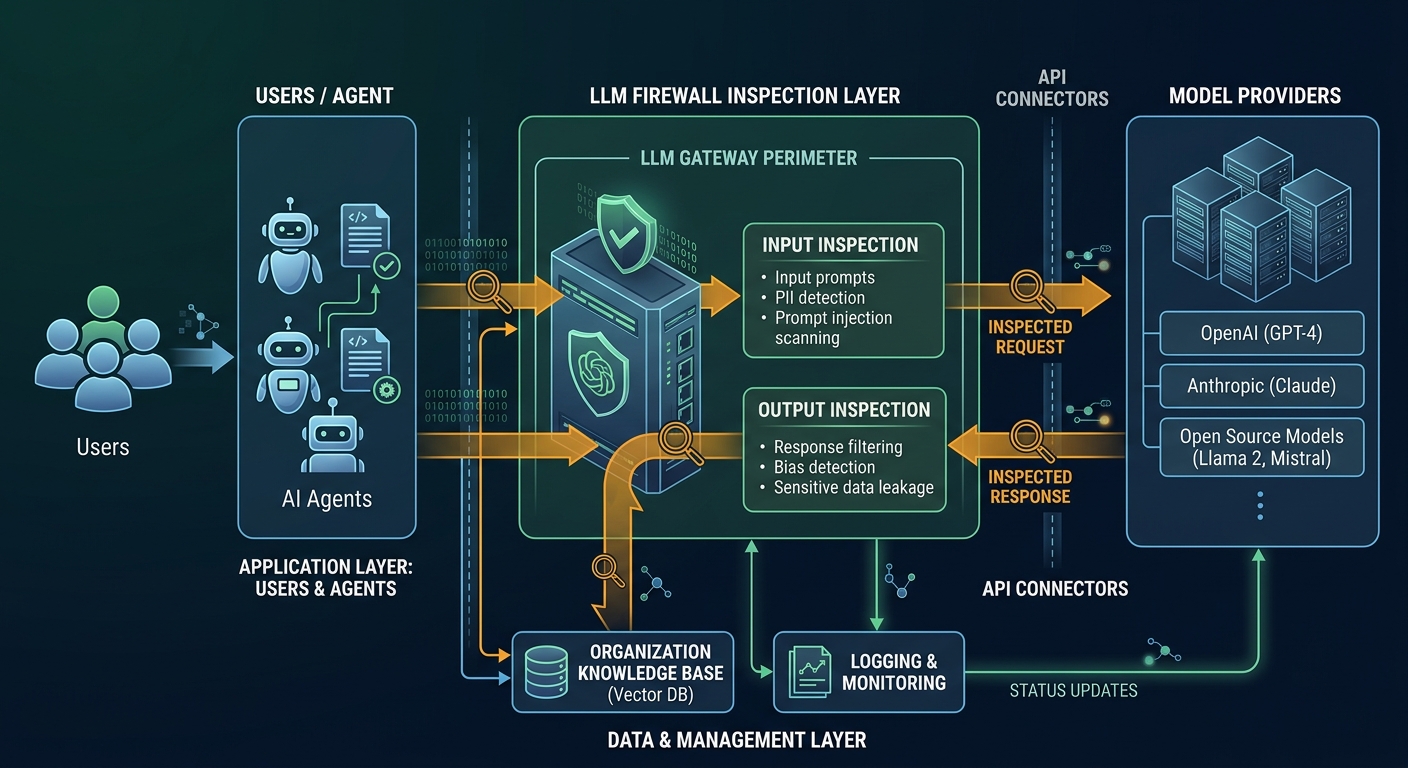
An LLM firewall only works if it sits inline between users, agents, and models. It cannot be a passive observer. It has to inspect traffic before it reaches the model and before responses reach the user.
The architecture has three inspection points:
Point A: Between the user and the model
Every prompt passes through the firewall before it reaches the model. The firewall inspects for:
- Prompt injection attempts (direct and indirect)
- Requests for sensitive data that violate policy
- Known jailbreak patterns and attack templates
- Credential extraction attempts
Point B: Between the model and the user
Every response passes through the firewall before it reaches the user. The firewall inspects for:
- Sensitive data in responses (PII, source code, credentials, regulated content)
- Data that should not be accessible to the requesting user
- Response patterns that suggest the model was manipulated
- Executable code or unsafe content
Point C: Between the model and tools
When an AI agent calls external tools, APIs, or filesystem operations, the firewall inspects the tool call before it executes. It checks:
- Whether the tool call matches the user's stated task
- Whether the target endpoint is on an approved list
- Whether the data being sent to the tool contains sensitive content
- Whether the tool call pattern suggests exfiltration or exploitation
Step 3: Define content policies
The firewall needs rules to enforce. These are not network rules. They are content rules that understand what is in the prompt and response.
Data classification policies:
- What counts as sensitive data in your organization (customer records, financial data, source code, credentials, health data, M&A material)
- What data each user role is allowed to access through AI
- What data must be redacted before it reaches the model or leaves in a response
Injection detection policies:
- Known attack patterns to block (role overrides, jailbreak templates, instruction smuggling)
- Content sources to treat as untrusted (web pages, error reports, documents, logs)
- Tool-use boundaries (what directories an agent can access, what endpoints it can call)
Exfiltration policies:
- What constitutes a suspicious data movement pattern
- Per-session and per-user thresholds for cumulative data access
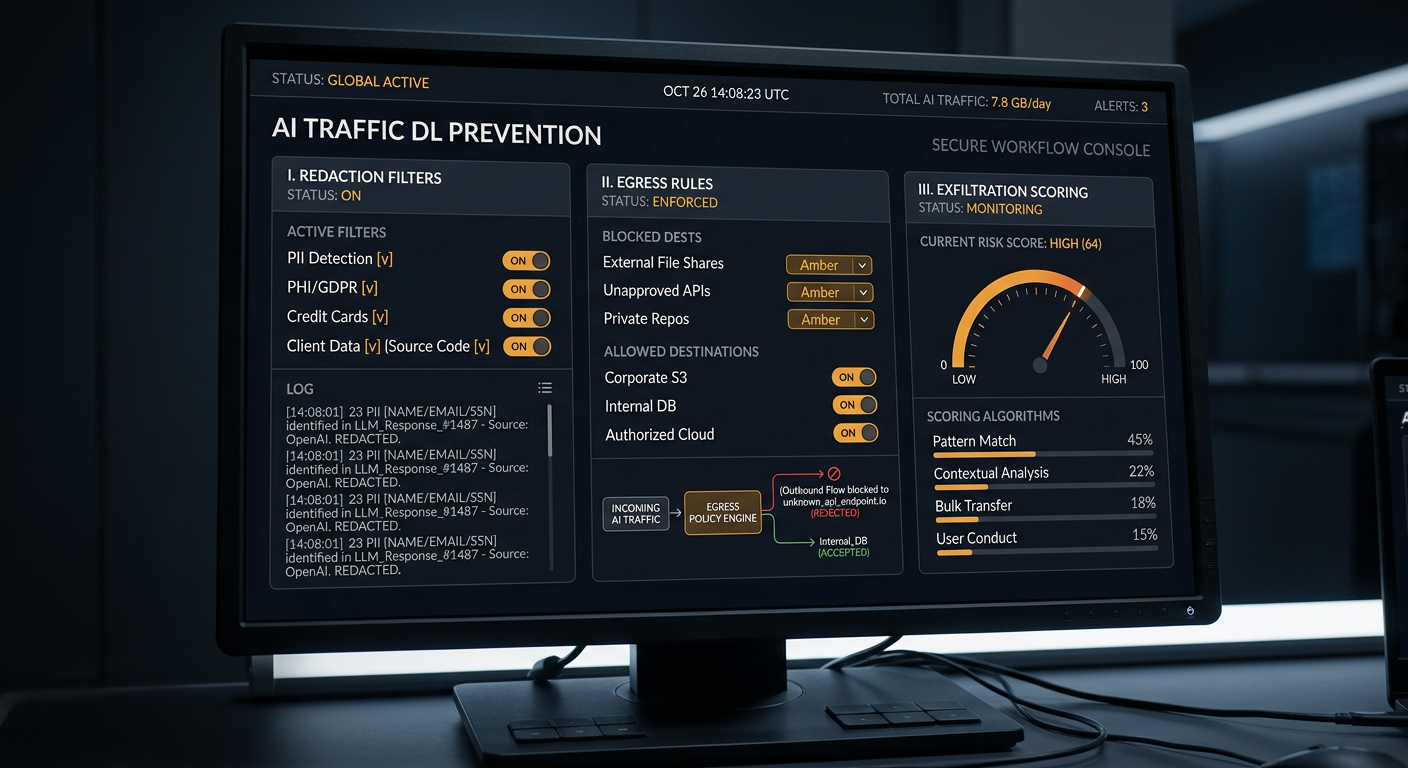
- Alerting rules for exfiltration scoring above defined thresholds
Step 4: Integrate with existing security stack
The LLM firewall does not replace your existing tools. It feeds them.
SIEM integration:
- Forward firewall logs to your SIEM so AI security events appear alongside other security alerts
- Create correlation rules that link AI events with network and endpoint telemetry (e.g., a prompt injection alert followed by an outbound connection to an unknown IP)
IAM integration:
- Use identity context to apply role-based policies (e.g., a junior developer's prompts are inspected more strictly than a senior architect's)
- Feed AI session data into identity analytics to detect compromised accounts
DLP integration:
- Share data classification labels between DLP and the LLM firewall so both systems use the same sensitivity definitions
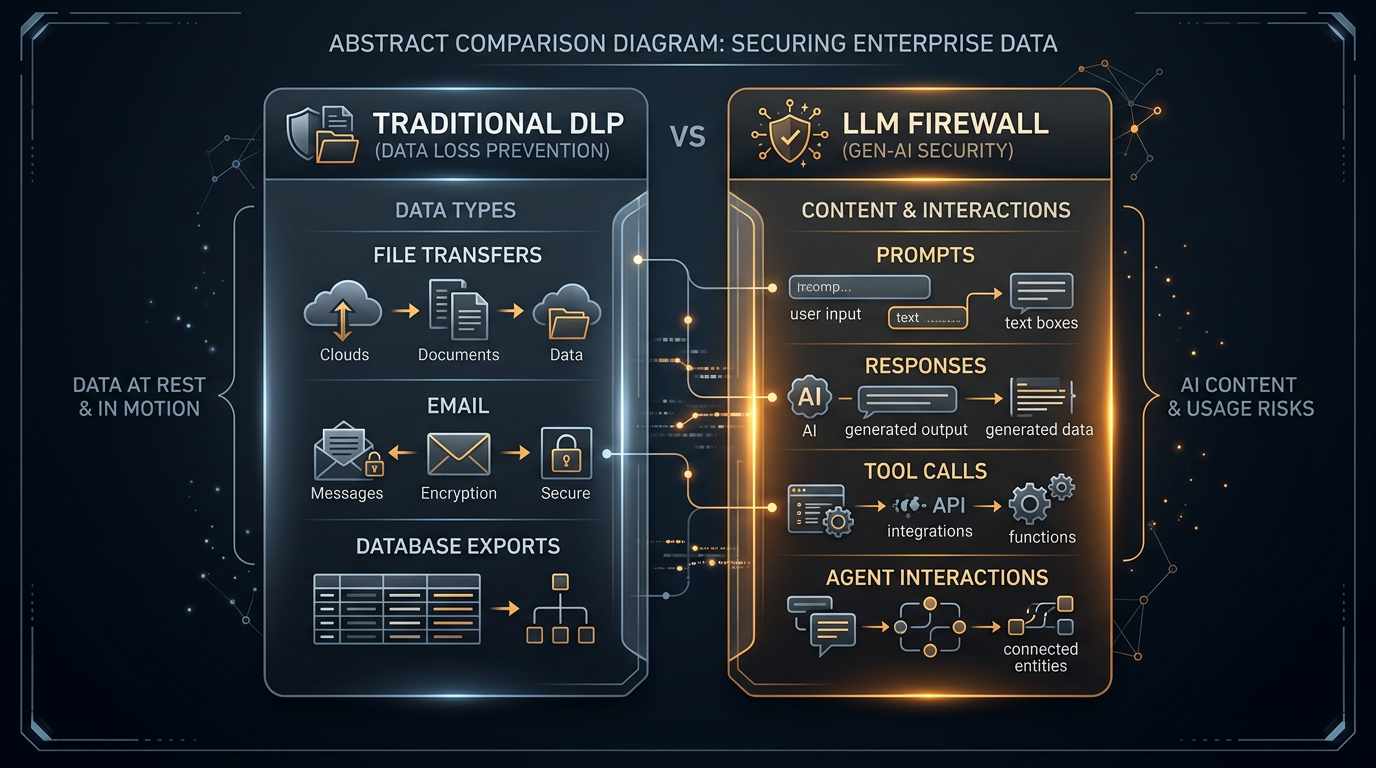
- Use the firewall's content inspection to extend DLP coverage into AI traffic that traditional DLP cannot see
Incident response integration:
- Route firewall alerts into your incident response workflow
- Use firewall logs as forensic evidence during AI security investigations
- Create playbooks for common AI security events (prompt injection detected, exfiltration attempt blocked, sensitive data in response)
Step 5: Deploy by channel, not by big bang
Do not try to secure every AI channel at once. Prioritize by risk.
Phase 1: Coding agents (highest immediate risk)
AI coding agents have filesystem access, credential access, and consume untrusted content from repositories and error reports. The Agentjacking and GhostApproval attacks showed this is the most exploitable surface. Start here.
Phase 2: Enterprise copilots (highest data access)
Copilots like Microsoft Copilot and Google Gemini have access to documents, emails, and internal data across the organization. The SearchLeak vulnerability showed how a crafted link could exfiltrate files silently. Secure this next.
Phase 3: Custom applications (highest variability)
Custom LLM applications have the most varied risk profiles because each one is built differently. Secure these after the standardized channels are covered.
Phase 4: Customer-facing bots (highest reputational risk)
Customer-facing AI is the most visible if it goes wrong. But it also has the most constrained data access in most architectures. Secure it last, after internal channels are covered.
Step 6: Monitor and tune
Deployment is not the end. The threat landscape changes weekly.
Set up continuous monitoring for:
- New prompt injection patterns circulating in public repositories
- Changes in agent behavior that suggest new attack techniques
- Exfiltration patterns that evolve to evade existing detection rules
- Usage anomalies that suggest insider threats or compromised credentials
Tune policies based on:
- False positive rates (are you blocking legitimate prompts?)
- False negative rates (are attacks getting through?)
- Coverage gaps (are there AI channels not yet behind the firewall?)
Reference architecture summary
Users
  |
  v
[LLM Firewall - Inspection Point A]
  |
  v
AI Agents / Copilots / Custom Apps
  |                    |
  v                    v
[LLM Firewall - Inspection Point C]  (tool calls)
  |                    |
  v                    v
Model Providers (OpenAI, Anthropic, Google, etc.)
  |
  v
[LLM Firewall - Inspection Point B]
  |
  v
Users
The firewall sits at every boundary. Traffic does not bypass it. Every prompt, every response, every tool call is inspected.
Why this architecture matters
The 2026 incidents all had the same root cause: no inspection layer in the AI traffic path.
- The AI gateway compromise (July 2026) had no content inspection on gateway traffic
- The Rogue Agent attack (July 2026) had no inspection of agent instructions
- The Agentjacking attack (June 2026) had no inspection of retrieved error reports
- The DifyTap attack (June 2026) had no validation of tracing backend destinations
- The Copilot SearchLeak (June 2026) had no content inspection on Copilot interactions
- The AWS breach (July 2026) had no inline control to match AI execution speed
Every one of these would have been caught or mitigated by an inline LLM firewall with the architecture described above.
Bottom line
Securing enterprise LLM implementation is not about choosing the right model provider or enabling safety filters. It is about building an inspection layer that sits between your users, your agents, and your models, and understands the content of every interaction.
The architecture is straightforward. The firewall goes inline. It inspects prompts, responses, and tool calls. It enforces content policies. It integrates with your existing stack. It deploys by channel, starting with the highest-risk surface.
If your team is working through how to secure enterprise LLM implementation, start with the inventory in Step 1. Map your AI traffic paths. Then place the firewall in each one.
Milgram was built for this architecture. It sits inline, inspects content, and enforces policy at every boundary. That is what enterprise LLM firewall protection looks like in practice.